





 Erik "Nord" Fanger
CS2 community servers are one of those parts of Counter-Strike that are easy to miss if you mainly play Premier, matchmaking or quick Deathmatch. And that is a shame, because this is often where the most interesting fun begins. On community servers you will find training modes, surf, retake, 1v1 arenas, bhop, KZ, zombie, minigames, skin servers and plenty of other variants that do not exist in standard gameplay.
For many players, CS2 community servers are the best place for training, warm-up and more relaxed play without ranking pressure. You can join for a few minutes, shoot a bit, practice movement or launch a mode that feels completely different from classic 5v5. That is exactly their biggest charm - you do not always have to play “for the result”. Sometimes you can simply join, warm up your hand and have a good time.
What are CS2 community servers?
Servers created by players and the community
CS2 community servers are servers run by players, groups, communities or external projects. They are not part of Valve’s official matchmaking, so they can operate under their own rules. Server admins choose maps, modes, plugins, commands, player limits and gameplay settings themselves.
In practice, this means one server can be a classic deathmatch for warm-up, another can be a 1v1 arena, a third can be a surf map, and another can be a place to test skins. It is a space where the CS2 community experiments with the game and creates its own ways to play.
Are there community servers in CS2?
Yes, there are community servers in CS2. You can join them through the server browser, external websites with server lists or directly through a console command. If you remember community servers from CS:GO, the general idea is very similar, although in CS2 some things work a little differently and may feel less intuitive.
The most important thing is that community servers are still a living part of Counter-Strike. Players use them for training, entertainment, map testing, movement learning and game modes you will not find in the official menu.
How are they different from regular matchmaking?
Official matchmaking has fixed rules, a map pool, rank system and standard gameplay format. Community servers are much more flexible. They can have instant respawns, custom rounds, different starting weapons, their own commands, expanded menus or completely custom maps.
The simplest comparison? Matchmaking is classic Counter-Strike according to Valve’s rules. A community server is Counter-Strike according to the community’s rules. Sometimes more training-focused, sometimes more meme-like, and sometimes just perfect for chill play after a few tough matches.
Why play on CS2 community servers?
They are a great place to train
If you want to improve aim, reflexes or recoil control, community servers are much better than waiting for duels in a classic match. In Premier, you spend a large part of the round positioning, rotating, holding angles or waiting after death. On a deathmatch server or 1v1 arena, you are playing almost all the time.
The more real duels you play in a short time, the faster your mechanics improve. That is why many players launch DM, retake or aim maps before ranked. It is a quick way to warm up your hand and check whether your spray is working today or whether you should shoot a little longer first.
You can take a break from Premier pressure
Not every match has to be a fight for rating. Sometimes you just want to join a server, surf, play minigames or shoot without pressure. CS2 community servers give you exactly that option.
It is a good choice when you are tired of toxic teammates, lost force buys and the classic “last game, trust me” that ends with three more losses. On community servers, the vibe is often more relaxed, and the gameplay is more focused on fun or training a specific skill.
It is easier to practice specific situations
Some modes are made specifically for learning. Retake lets you practice retaking a bombsite, 1v1 arenas help with duels, and KZ and bhop servers develop movement. Thanks to this, you do not have to wait for a specific situation to happen in a normal match.
What is best to practice on community servers?
- Aim and quick crosshair placement.
- Recoil control with the AK-47, M4 and other weapons.
- 1v1 duels.
- Bombsite retakes.
- Movement, bunny hop and air-strafing.
- Playing under time pressure.
- Reacting to unusual enemy positions.
- Warm-up before Premier or FACEIT.
How to find and join a CS2 community server?
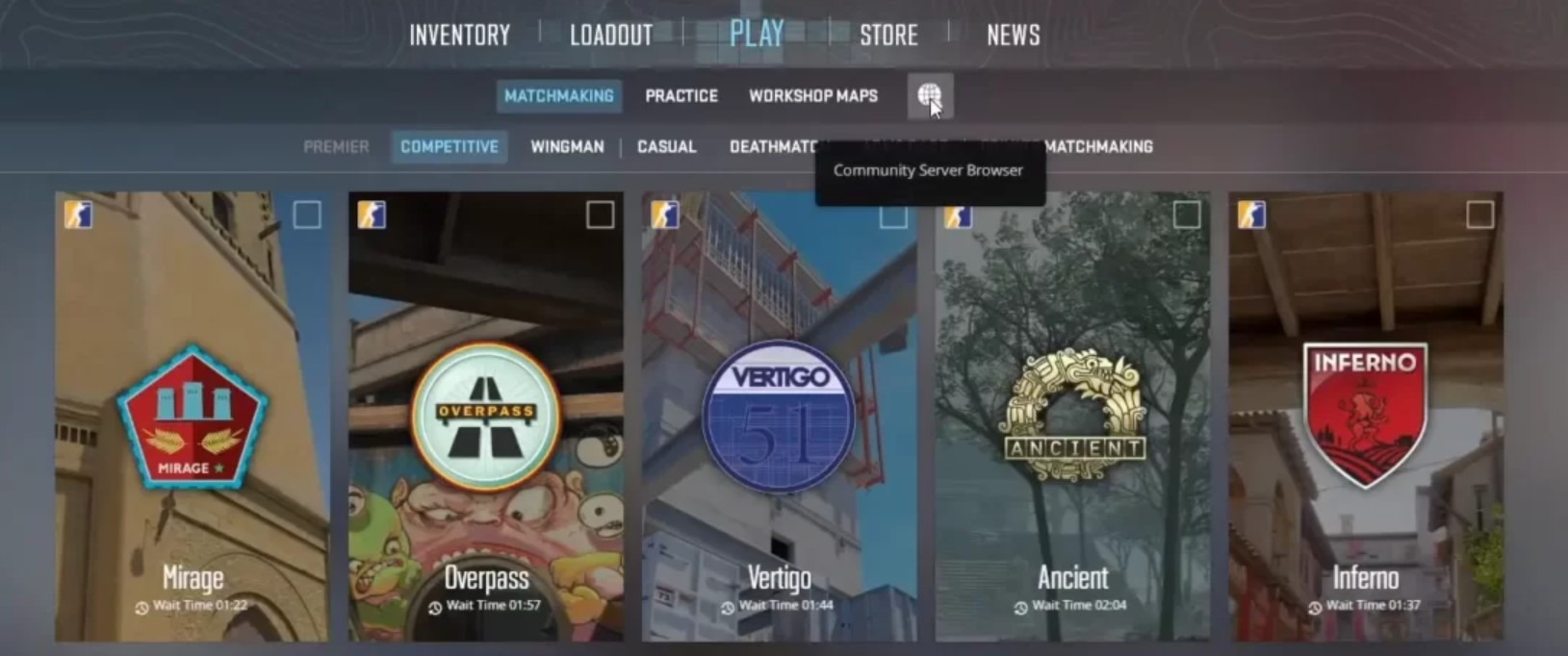
Original graphic by our editorial team.
Joining through the server browser
The easiest method is to use the server browser. You can search for servers by name, map, player count, mode or ping. In theory, it sounds simple, but in practice the browser can be temperamental, so it is worth being patient and setting filters properly.
It is best to choose servers with low ping, active players and a clear mode name. If you see a server with very high latency, it is better to skip it - even the best mode will not be enjoyable if enemies look like they are teleporting around the map.
How to join through the server browser?
- Launch CS2 through Steam.
- Go to the game section and find the community servers option.
- Open the server browser.
- Set filters, such as region, ping, map or player count.
- Refresh the list.
- Choose a server that looks reasonable.
- Click connect.
- Wait for the game to download the required map files.
Joining through the console
The second method is joining through the console with the connect command. This is very convenient if you have a specific server IP address. Many external websites with server lists show a ready address in the IP:PORT format that you only need to copy.
How to join with the connect command?
- Enable the developer console in CS2 settings.
- Copy the server address in IP:PORT format.
- Open the console with the
~key. - Type
connect IP:PORT. - Press Enter.
- Wait for the game to connect to the server.
Pro tip: if the console does not work, check the settings and make sure it is enabled. Many players forget about this option and then wonder why the ~ key does nothing.
Where to look for CS2 community servers?
Besides the built-in browser, it is worth using websites that collect server lists. They are often more convenient because they let you quickly filter modes, regions, ping and player count.
| Website or platform | What is it useful for? |
| CS2Browser | Searching servers by mode, ping, region and player count. |
| xplay.gg | Popular training servers, DM, retake, aim and other modes. |
| CYBERSHOKE | Servers for DM, retake, surf, bhop, KZ and training modes. |
| BattleMetrics | Server list with basic activity information. |
| Community server websites | Often include their own rankings, stats and IP addresses. |
It is worth adding good servers to favorites. If you find a stable DM with low ping or a fun retake server, there is no reason to search for it again later.
How to join a friend on a community server?
Joining through Steam
If your friend is already playing on a server, first try joining through your Steam friends list. Sometimes you just need to click your friend and choose the option to join the game. It is the simplest solution, but unfortunately it does not always work perfectly.
A problem can appear when the server is full, private, password-protected or does not allow quick joining through Steam. In that case, it is better to use the IP address.
Joining through an IP from a friend
The most reliable way is to ask your friend for the server address. If they know the IP, you can paste it directly into the console and join without searching the server list.
How to join a friend through IP?
- Ask your friend for the server address.
- Copy the IP in IP:PORT format.
- Open the console in CS2.
- Type
connect IP:PORT. - Confirm the command with Enter.
- If the server has a password, enter it according to your friend’s instructions.
Pro tip: if you regularly play on the same servers, save their addresses. It saves time, especially when you want to jump into a quick warm-up before Premier together.
Popular game modes on CS2 community servers
Deathmatch and FFA DM
Deathmatch is an absolute classic. You join, respawn quickly and shoot without long waiting. FFA DM, or Free-For-All, means everyone can shoot everyone. This creates more duels and makes the warm-up more intense.
It is the ideal mode before more serious play. If after a few minutes on DM you still cannot hit simple shots, maybe it is better not to launch Premier just yet. Everyone knows that pain.
Retake
Retake is one of the most practical training modes. It simulates a post-plant situation. Terrorists defend the bombsite, while counter-terrorists try to retake it.
Retake is great for learning quick decision-making, clearing positions and playing under time pressure. It is one of those modes that genuinely transfers to normal matches.
Aim and 1v1 arena
Aim and 1v1 servers are built for duels. There is no bigger tactic, economy or long rotations here. It is you, the opponent and the crosshair. It sounds brutal, but it works.
It is a great place to test sensitivity, crosshair, graphics settings or simply check whether today is your “on fire” day or a day of whiffing the whole magazine.
Surf
Surf is a mode that feels more like a separate game than classic CS2. You move along special ramps, keep your speed and try not to fall after three seconds. At first it can be frustrating, but once you catch the flow, surf can pull you in for many hours.
It is a good mode for taking a break from ranked. It still requires skill, but it does not punish you with rating loss for every mistake.
KZ and bhop
KZ and bhop focus on movement. KZ usually involves overcoming obstacles and climbing through a map, while bhop is about maintaining speed through proper jumps and strafes.
These modes will not instantly turn you into an entry fragger, but they will improve movement control. And in CS2, movement still matters a lot - especially during peeks, jump spots and quick positioning on the map.
Zombie, minigames and casual modes
On community servers, you will also find purely entertainment-focused modes: zombie escape, jailbreak, hide and seek, minigames and various custom gameplay variants. They will not always help your rank, but they are great if you want to play more casually.
Counter-Strike does not always have to be serious. Sometimes the best evening in CS2 is not ranking up in Premier, but a totally chaotic zombie server with friends.
Are CS2 community servers safe?
Yes, but use common sense
Are CS2 community servers safe? In most cases, yes, as long as you choose well-known, active and well-moderated servers. The risk begins when you enter suspicious websites, download strange files or log in with Steam where you should not.
Playing on a popular community server is usually not a problem. The real problems are chat links, fake giveaways, websites pretending to be Steam and external programs promising free skins.
What should you watch out for?
The most important rule is simple: do not install suspicious add-ons, skin changers, launchers or files sent by random players. If a server requires downloading something outside Steam or from an unknown website, it is better to skip it.
Also watch out for messages like “claim a free knife”, “log in to get a skin” or “click the link for a reward”. In CS2, skins have real value, so there are plenty of scammers.
How to play safely on community servers?
- Choose well-known and active servers.
- Avoid servers with suspicious names and chat spam.
- Do not click links sent by strangers.
- Do not log in with Steam on random websites.
- Do not give anyone Steam Guard codes.
- Do not install external skin changers.
- Use servers recommended by the community.
- Check whether the login page really belongs to Steam.
- Do not download “special packs” required by unknown servers.
- If something looks suspicious, simply leave the server.
How to improve performance on community servers?
Choose servers with low ping
The most important thing is ping. Even the best server will be annoying if latency is too high. With high ping, shots may feel delayed, enemies react strangely, and movement stops feeling smooth.
For players from Poland, it is best to look for European servers with the lowest possible ping. The difference between 25 ms and 120 ms is huge, especially on DM, 1v1 arenas and retake servers.
Adjust graphics settings
Custom maps and servers with many players can put more load on your computer. If the game starts dropping frames, CS2 itself is not always to blame. Sometimes the issue is a heavy map, plugins or too many effects.
How to improve CS2 performance on community servers?
- Choose servers with low ping.
- Close your browser and unnecessary background apps.
- Lower graphics settings if FPS drops.
- Check whether you are playing in fullscreen mode.
- Update your graphics card drivers.
- Verify game files in Steam.
- Remove old configs if they cause problems.
- Test different servers of the same mode.
- Avoid overloaded servers with a huge number of slots.
- Save only the servers that run stably.
Not every lag is your fault
If one server runs terribly and another runs smoothly, the problem is most likely on the hosting or server side. You do not need to immediately reset your whole computer, delete your config and change every setting. First, check another server.
CS2 community servers and skins
Skins are part of the CS2 atmosphere
There is no hiding that skins are a huge part of Counter-Strike. They often play a big role on community servers too. Some servers let you test different skins, knives or gloves only within that server. It is a nice option if you want to see how a skin looks in motion, not only on a screenshot.
For players interested in skins, community servers can work like a small showroom. You can check animations, weapon appearance on different maps and how a specific knife and glove combo looks in practice.
Watch out for fake promises of free skins
However, you need to clearly distinguish server skin menus from real skins in your Steam inventory. If a server lets you use a skin during gameplay, it does not mean you own it. It is only a function working locally on that server.
Do not trust websites and programs that promise free skins for logging in, downloading a file or sharing account data. In CS2, skins have real value, which is why they are one of the main targets for scammers.
Is it worth testing skins on servers?
Yes, especially if you plan to buy a more expensive item. A skin may look great in a picture, but only in game can you see how it behaves during inspect, shooting and running around the map. This is especially important with knives, gloves and skins with different patterns.
What to do when CS2 community servers do not work?
First check filters and refresh the list
Sometimes the problem is simple. The server list may not appear because filters are set incorrectly, your ping limit is too low or you selected a specific map that nobody is currently playing. Before looking for complicated solutions, reset filters and refresh the list.
What to do when servers do not show up?
- Refresh the server list.
- Reset all filters.
- Check whether the internet servers tab is selected.
- Increase the ping limit.
- Remove a filter for a specific map or mode.
- Restart CS2.
- Restart Steam.
- Try joining through the
connect IP:PORTcommand. - Verify game files.
- Check whether the problem affects all servers or only one.
Problems after a CS2 update
After major CS2 updates, some servers may not work properly for a while. Admins sometimes need to update plugins, maps or configurations. If your favorite server goes down right after an update, it is best to give it some time and check the Discord or website of that community.
VAC error or secure server issue
If the game does not let you join a VAC-secured server, the cause may be game files, background programs, modifications or a Steam issue. In that case, start with simple steps: restart Steam, restart your computer, verify game files and turn off suspicious apps.
Do not use random “VAC fixers” downloaded from the internet. That is a quick path to bigger problems than the connection error itself.
Summary
Is it worth playing on CS2 community servers?
Definitely yes. CS2 community servers are a great place for training, warm-up, skin testing, movement learning and taking a break from classic matchmaking. They give access to modes you will not find in official gameplay and also let you discover active player communities.
If you want to improve aim, choose DM or 1v1 arenas. If you care about match situations, launch retake. If you want to take a break from rating, try surf, KZ, bhop or minigames. The most important thing is to choose trusted servers, watch out for suspicious links and save the places where you enjoy playing most.
The final conclusion is simple: CS2 community servers are one of the best ways to discover Counter-Strike from a less obvious, more community-driven side. And if you are also interested in skins, follow G4Skins - you will find guides, interesting facts and practical tips for CS2 players.
FAQ
Are there community servers in CS2?
Yes. In CS2, you can play on community servers using the server browser, server list websites or the connect IP:PORT command.
Are CS2 community servers safe?
Usually yes, if you choose known and moderated servers. Avoid suspicious links, external programs and fake Steam login pages.
How do I join a CS2 community server?
You can use the CS2 server browser or type the connect command with the server IP address in the console.
Where can I find CS2 community servers?
It is best to search in the server browser, on CS2Browser, xplay.gg, CYBERSHOKE, BattleMetrics or websites of specific communities.
How do I join a friend on a community server?
You can try joining through your Steam friends list or ask your friend for the server IP address and use the connect command.
Why are CS2 community servers not showing up?
The most common causes are filters, a list refresh issue, a temporary Steam error, a game update or a connection problem.
What modes are popular on CS2 community servers?
The most popular modes are Deathmatch, FFA DM, Retake, Aim, 1v1 Arena, Surf, KZ, Bhop, Zombie Escape and Minigames.
Can you test skins on community servers?
Yes, some servers allow you to test skins, knives and gloves. However, this works only on that server and does not add items to your Steam inventory.
Do community servers help with ranked play?
Yes. DM improves aim, retake teaches bombsite retakes, and 1v1 arenas help you win duels.
What should I do if I cannot join a server?
Reset filters, refresh the list, restart CS2 and Steam, check the server IP address and verify game files in Steam.

_1.webp)