BEWARE OF SCAMMERS ON STEAM!
We care about our users; below you can learn how scammers operate.
We care about our users; below you can learn how scammers operate.



ANYONE WHO ADDS YOU ON STEAM PRETENDING TO BE AN ADMINISTRATOR

IS A SCAMMER

This is one of the most common forms of scamming on Steam – someone messages you and pretends to be someone they are not. It could be "your friend," a "Steam employee," a "G4Skins Bot," or even a popular creator from the CS2 scene. They often have professional-looking profiles, many hours in-game, badges... but it's all a ruse. The goal is always the same – to trick you into giving access to your account, your skins, or forcing you to click on a fake link.

The scammer creates a profile strikingly similar to someone you know – they steal the avatar, nickname, and even the status.
Sounds familiar? It's a classic method to take over your account or items.
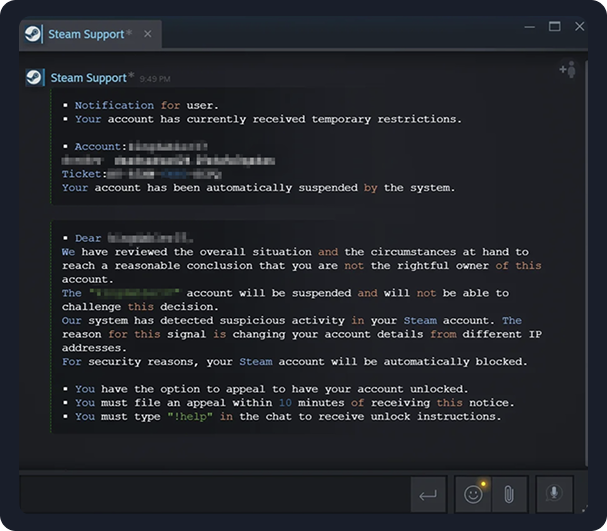
The scammer pretends to be a "Steam Admin" or "G4Skins Support". They write that:
Finally, they ask you to click a link, log in, or give them access to items to "check them manually."
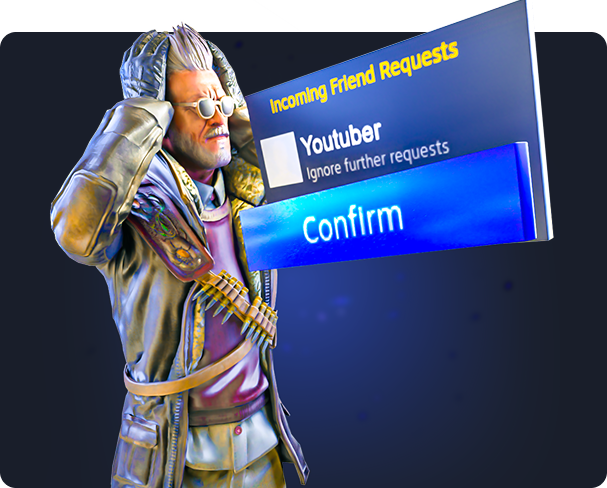
You receive a message from a person who looks like a popular YouTuber, streamer, or influencer. They are supposedly organizing a giveaway, collaboration, rewards... and invite you to participate. The condition? You must click a link, log in on a "partner site," or confirm something in a trade.

Steam does not have private support in chat
No "admin" will ever message you. The only legit form of contact with Steam is: https://help.steampowered.com/en/
G4Skins never messages through Steam
Support only works through the contact form on the site. The only legit form of contact with us: https://g4skins.com/support
Always check the profile carefully
Click on the avatar, check the URL, hours in-game, and account creation date.
Do not click on links
from people you don't know or who behave "weirdly."
Use Steam Guard
thanks to this, a thief won't be able to log in without your confirmation.
Read about what Steam Guard is
Details can be found at this link: https://help.steampowered.com/en/faqs/view/06B0-26E6-2CF8-254C

Sometimes a scammer doesn't need to talk to you for long – it's enough if you click a link and log in, and your account goes to them on a silver platter. Phishing is a method where scammers create forged Steam login pages or fake versions of sites with trades, giveaways, tournaments, etc. Everything looks real... but it's not. The goal is always the same – to trick you into giving access to your account, your skins, or forcing you to click on a fake link.
You receive a link to a "trade," "giveaway," or "tournament"

You click – the site looks 1:1 like Steam: logo, colors, even the login window is identical. But the site address is something like:
All you have to do is enter your login and password – and the scammer already has access to your account. Within minutes, they can:

You get a message that you've won a skin, a drop, a Steam wallet code, or some "super prize." To claim it – you just need to click the link and log in to your Steam account.
Sounds like a dream? In reality, it's classic phishing.
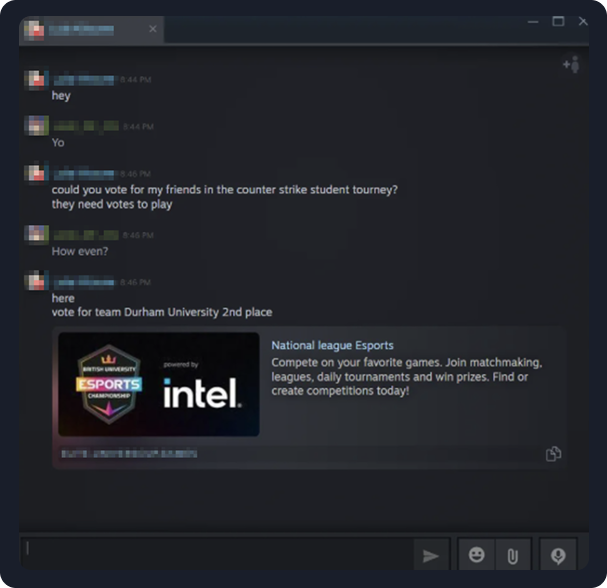
Someone messages you saying they're participating in a CS2 tournament and asks you to "vote for them." They provide a link to a site that looks like an official esports organization or a voting page. But it's another phishing attempt – once you log in, your account is gone.
All you have to do is enter your login and password – and the scammer already has access to your account. Within minutes, they can:
Links to such "giveaways" often appear on Discord, Facebook, Instagram, and Twitter.
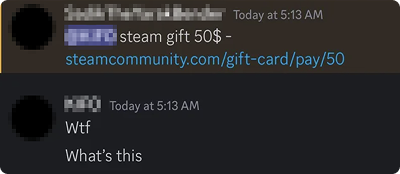
Scammers send them from fake fanpages, creator accounts, moderators, or friends whose accounts have been compromised.
Everything on the site looks real:
Always check the website address in your browser.
Real Steam pages end in steamcommunity.com, steampowered.com, store.steampowered.com.
Do not click on suspicious links
even if they look good. Always check where they really lead.
If a site requires a Steam login
ensure the site address is an official domain.
Do not believe in giveaways from nowhere
If something sounds too good to be true - it's probably a scam.
Use Steam Guard
thanks to this, a thief won't be able to log in without your confirmation.
Read about what Steam Guard is
Details can be found at this link: https://help.steampowered.com/en/faqs/view/06B0-26E6-2CF8-254C