


 Kamil "Ravik" Borkowski
You have a few cases in your inventory, you are browsing their contents and start wondering what you can actually do with them. Open the case directly in CS:GO / CS2? Leave it for later? Or check out a platform built specifically around case opening?
If you are only just getting into skins, it is easy to get lost, because cases now come in several different models. Valve has an official system connected to the Steam Inventory and keys. Alongside it, there are separate case opening platforms, such as G4Skins, which have their own cases and their own rules.
That is why the question "where to open CS:GO / CS2 cases?" is not simply about naming one website. First, it is worth understanding the difference between opening a case within the Counter-Strike ecosystem and using a dedicated case opening service. In one model, you are using an item already stored in your Steam inventory. In the other, you are using a case available within a specific platform.
Below, we will go through both options, check what they require, explain how free cases work and show what is worth paying attention to before you start.
Where can you open CS:GO / CS2 cases?
The first place is, of course, the official Counter-Strike system. If a case is in your Steam inventory, you can access it directly from the game. A standard case requires the appropriate key, and once it is opened, the received item goes directly into your inventory.
The second option is case opening platforms operating outside Valve's official system. They have their own case catalogues and do not require a specific case to already be present in your Steam Inventory. You choose a case directly on the platform and use the mechanism provided by that service.
This is an important distinction. A case on an external platform is not the same item as a case stored in your CS:GO / CS2 inventory. Before using a service, it is therefore worth understanding how the account works, how items are handled and what rules apply to receiving them.
It is best to check in advance:
-
who operates the platform,
-
how login works,
-
whether the contents of the case are visible before opening,
-
how items are handled,
-
what age restrictions apply,
-
where the terms and conditions are located,
-
whether a help section is available.
The graphic or name of a case alone tells you very little about the entire system. What matters much more is understanding exactly what you are using.
How to open cases in CS:GO / CS2?
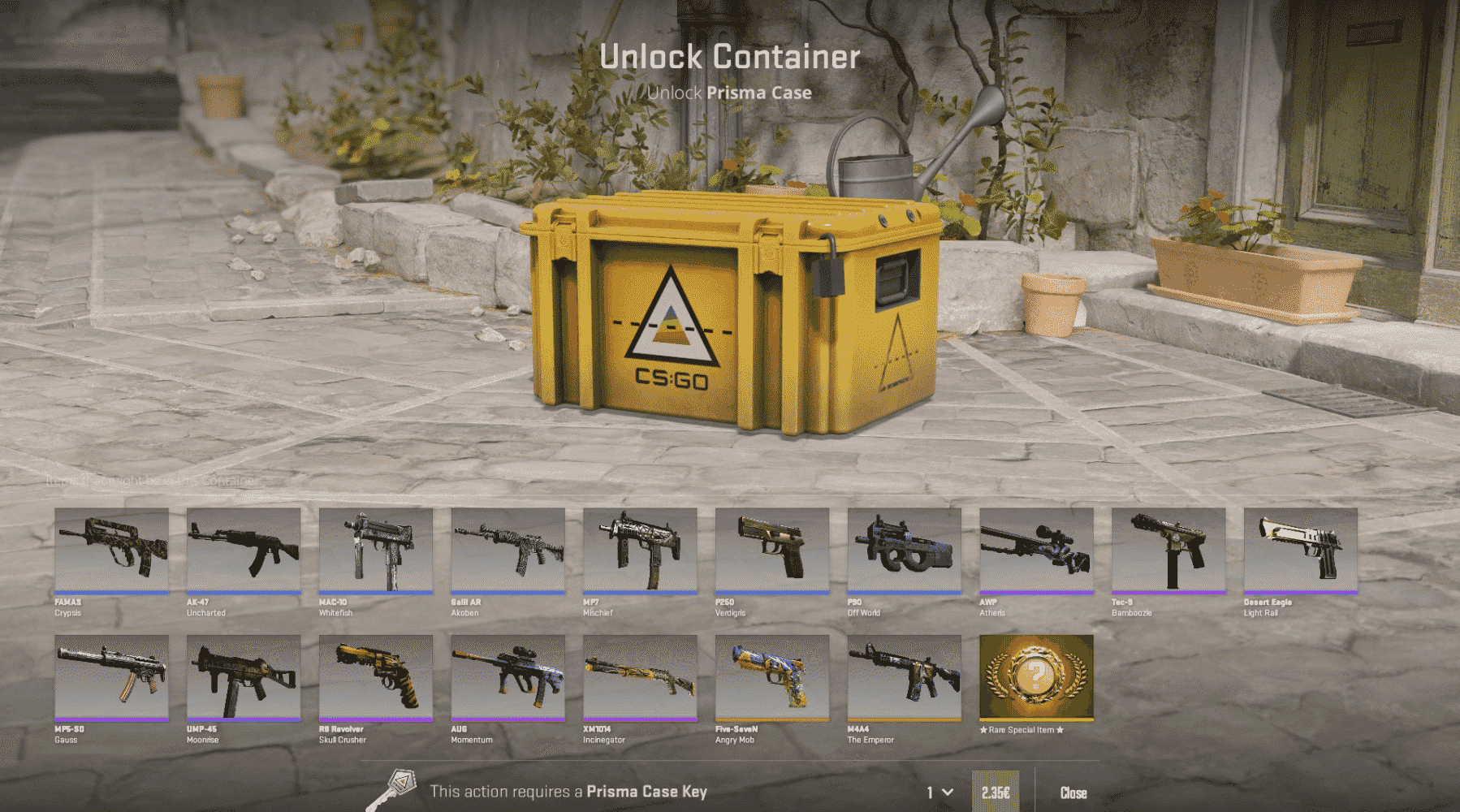
If you have a case in your Steam Inventory, the process is fairly simple. Open your inventory in Counter-Strike, choose the case you are interested in, check its contents and proceed to opening it.
Standard Valve cases require the appropriate key. The case itself and opening it are therefore two separate elements.
How does opening a case work step by step?
-
Launch Counter-Strike and open your inventory.
-
Choose the case you want to open.
-
Check its contents.
-
Proceed to the opening option.
-
The game will show the required key.
-
Once the process is complete, the item will appear in your Steam inventory.
If you are wondering how to open cases in CS:GO / CS2, the technical process itself is not complicated. It is worth spending more time deciding which case you want to use and what items are associated with it.
What do you need to open a case?
With standard Valve cases, the case alone is not enough – you need the appropriate key to open it. The game shows it before opening.
Before you open a case, check its contents and what opening it requires. That way, you know exactly what you are using.
Where to open CS:GO / CS2 cases outside the game?
Outside Valve's official system, there are platforms focused specifically on case opening. Instead of using a case already stored in Steam Inventory, you choose one directly from the catalogue available on the service.
Such platforms may offer many different categories of cases in one place. Each service, however, operates according to the rules of its own operator, so it is worth checking the login process, account system and what happens to an item after opening before you begin.
An external case opening service and Valve's official system are two different models. This is particularly important to remember when moving from Steam cases to a platform operating outside the game for the first time.
G4Skins as a case opening platform
One of the platforms focused on CS:GO / CS2 cases is G4Skins. The service has its own case catalogue, and users log in using their Steam account.
Before opening a specific case, you can see which items are inside. This makes it easier to compare several cases and check which one best matches what you are currently looking for.
G4Skins also has a Daily Case. This is a separate case that can be opened for free.
Counter-Strike and G4Skins - what is the difference?
If you want to compare the two systems quickly, it is easiest to place them side by side. They differ not only in where cases are opened, but also in what you need and how cases available without buying a separate case work.
|
Element |
CS:GO / CS2 and Steam |
G4Skins |
|
Where does opening take place? |
In the official Counter-Strike system |
On the G4Skins platform |
|
What is required? |
Steam account, a case in your inventory and the appropriate key |
Account connected through Steam and meeting the requirements of the specific case |
|
Is a Valve key required? |
Yes, for standard cases |
No - cases operate within the G4Skins system |
|
Where does the case come from? |
It is in your Steam inventory |
You choose the case directly from the G4Skins catalogue |
|
Can you check the contents in advance? |
Yes |
Yes |
|
Where does the received item go? |
Directly to Steam Inventory |
First to the G4Skins system, then according to the platform's rules |
|
Is the case an item from Steam Inventory? |
Yes |
No |
|
What model is it? |
Valve's official case system |
A case opening platform with its own case catalogue |
The key difference is very simple. In Counter-Strike's official system, you open a specific item stored in your own inventory, while on G4Skins you choose a case that belongs to the platform's system.
Where is the best place to open CS:GO / CS2 cases?
The phrase "where is the best place to open CS:GO cases?" sounds as if there should be one answer for everyone. In practice, a lot depends on which model suits you better.
If you want to stay exclusively within the official Counter-Strike ecosystem, Valve's system is the natural choice. You have a case in Steam Inventory, use the appropriate key and the item appears directly on your account after opening.
If, on the other hand, you prefer a platform built specifically around case opening, you can use services such as G4Skins, where there is a separate catalogue of cases and a Daily Case.
There is little point in looking only at which platform has more cases. What matters most is whether the system suits you and whether you understand its rules.
How to check a platform before opening cases?
Before using an external service, it is worth spending a few minutes checking some basic information. You do not need to perform a full technical audit, but several things should be clear from the beginning.
What should you check?
-
See how login works and whether Steam authorisation looks correct.
-
Check the age requirements.
-
Read the account rules.
-
Check what happens to an item after opening.
-
See how items are transferred to your Steam account.
-
Check the help section and contact information.
-
Review the contents of the case before starting.
Steam security is especially important. Fake login pages and suspicious messages still appear around skins, so always check carefully which page you are logging in on.
What to expect from opening cases?
That depends on what you expect. If your goal is one specific skin, a case does not allow you to simply choose it before opening. You select the case and the pool of items associated with it.
Opening cases is best treated as a form of entertainment related to CS:GO / CS2 skins, not as a way to get a specific, pre-selected item. It is also a good habit to set your own limit and stick to it.
What should you watch out for when opening cases?
The simplest thing is your own limit. It is better to set it in advance and not change it along the way.
The second issue is account security. Always check where you are logging in. If something about a domain or message looks suspicious, it is better to verify the situation carefully before taking the next step.
The third issue is the case contents. Do not choose a case only because it has an interesting name or graphic. First, check the full list of items it contains and decide whether that pool of skins actually interests you.
Where to open CS:GO / CS2 cases - the key takeaway
If you are wondering where to open CS:GO / CS2 cases, you mainly have two different models to choose from. The first is the official Counter-Strike system, where the case is stored in Steam Inventory and standard cases require the appropriate key. The second is case opening platforms such as G4Skins, which have their own case catalogues.
On G4Skins, you can log in via Steam, browse the available cases and also use the Daily Case.
However, the place itself is not the most important thing. First, check how the chosen system works and what the case contains.
FAQ - common questions about opening CS:GO / CS2 cases
Where can you open CS:GO / CS2 cases?
You can open them through Valve's official system or use independent case opening platforms such as G4Skins.
How do you open cases in CS:GO / CS2?
Open your inventory, choose a case, check its contents and proceed to the opening option. Standard cases require the appropriate key.
Do you need a key for a CS:GO / CS2 case?
Yes. Standard weapon cases in Valve's official system require the appropriate key.
Does G4Skins have a Daily Case?
Yes. G4Skins has a Daily Case that can be opened for free.
Are G4Skins cases the same as Valve cases?
No. G4Skins cases operate within the platform's own system and are not the same cases stored in Steam Inventory.
Can I choose a specific skin in a case?
No. You open a case with a defined pool of items, without being able to choose a specific one.
What should you check before opening cases?
Check the case contents, the platform rules, login security and how items are handled. It is also a good idea to set your own limit in advance.